
Table of Contents
- 1. Why Security Matters in Modern eLearning
- 2. What is DRM and Multi-DRM Technology?
- 3. Key Security Features Every eLearning Platform Needs
- 4. Evaluating Multi-DRM Security Solutions for eLearning Platforms
- 5. Technical Steps to Build a Secure eLearning Application
- 6. How to Integrate Multi-DRM into Your eLearning App
- 7. Future Trends in Multi-DRM and eLearning Protection
- 8. Conclusion
- 9. FAQ
- 1. Why do eLearning platforms need Multi-DRM security?
- 2. How does Multi-DRM work in an eLearning application?
- 3. Which DRM systems are most important for eLearning apps?
- 4. What role does watermarking play in eLearning security?
- 5. Can Multi-DRM affect user experience for learners?
- 6. What should eLearning companies consider when selecting a Multi-DRM provider?
The global eLearning market keeps growing quickly, bringing in more than 100 billion USD yearly while reaching into personal, business, and school settings. Such fast uptake shows how people increasingly see worth in digital education materials. However, data from Statista indicates that around one in five internet users globally consumes digital content illegally, often due to poor access or steep prices. As a result, online courses face risks, since their videos, notes, and tests often get shared without permission.
With growth in eLearning, there has been a rise in costs and risks, unauthorized use cuts income or weakens course value or damages user confidence. Facing this issue requires better safeguards across services. Using multiple DRM tools limits who can view material, protects live video feeds while guaranteeing rules are followed consistently, mostly helping digital learning setups to stay strong amid change.
Why Security Matters in Modern eLearning
Security matters in today’s online learning systems, whether course videos or tests, both hold a real worth. There are frequent exposure to unapproved use or leaks causes services to suffer income drops while losing confidence among instructors or students. Safeguarding original work plays a key role in upholding reputation and usefulness across digital education setups.
Beyond protecting content, e-learning apps handle private user data such as personal info, activity logs, or financial details which makes them prone to attacks. Since users log in from different devices and connections, risks rise. Solid login controls, secure transmission, together with multi-DRM layers protect materials, build confidence, while enabling steady system expansion.
What is DRM and Multi-DRM Technology?
Digital Rights Management (DRM) is a system designed to guard digital material against illegal use. On an online learning site, it makes sure only approved people see videos, files, or tests. Access depends on rules defined by the service itself. These guidelines decide how much time users have with content. They also state what gadgets are permitted for viewing. Downloading may be blocked in some cases and offline access might require special permission.
Multi-DRM boosts security through different platforms like Google Widevine, Apple FairPlay, or Microsoft PlayReady. Because users access content on many devices and browsers, it enables smooth yet protected viewing across environments. Protection stays uniform whether on phones, desktops, or connected screens – blocking illegal copying or distribution. Instead of fragmented methods, this integrated system supports reliable, expandable, easy-to-use digital learning tools today.
Key Security Features Every eLearning Platform Needs
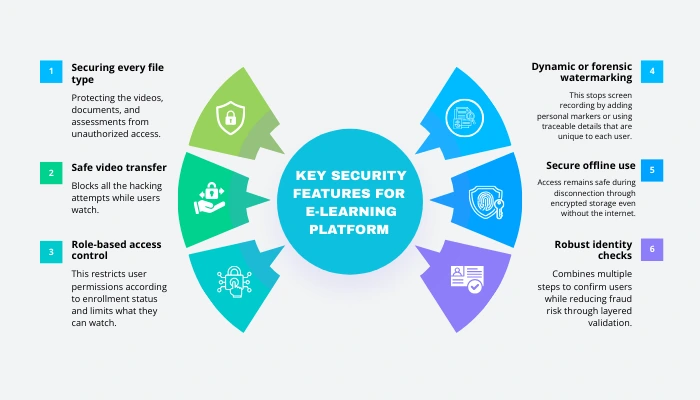
A secure online learning system uses several safeguards to protect lessons along with personal data. Below are key elements each system ought to include:
- Securing every file type: Protecting the videos, documents, and assessments from unauthorized access.
- Safe video transfer: Blocks all the hacking attempts while users watch. This allows streaming to be safe and protected from copying software through encryption methods, also stopping unauthorized access mid-playback.
- Role-based access control: This restricts user permissions according to enrollment status and limits what they can watch. Access will depend on subscription level, so individuals will only be allowed to see the relevant materials through defined roles.
- Dynamic or forensic watermarking: This stops screen recording by adding personal markers or using traceable details that are unique to each user.
- Secure offline use: Access remains safe during disconnection through encrypted storage even without the internet. Materials cannot be reached by unauthorized users.
- Robust identity checks: Combines multiple steps to confirm users while reducing fraud risk through layered validation.
Evaluating Multi-DRM Security Solutions for eLearning Platforms
Choosing a good Multi-DRM system matters when securing premium educational material on different devices. One key point is how well it works across setups i.e., compatibility with other devices counts. Always look for support of main DRM types like Widevine, FairPlay, or PlayReady, so that videos play without issues on browsers, Android phones or even Apple gadgets. By following this, students can get reliable access and at the same time, materials stay safeguarded.
Performance matters just as much as scalability. A solid vendor must ensure fast license activation, consistent availability, while supporting high learner traffic smoothly. Features like hidden tracking marks or tools blocking screen capture alongside clear usage reports often boost protection levels. Equally crucial how well it connects with current systems, clarity of guides, and responsiveness when issues arise. Opting for an established DRM partner offers modern content control solutions that allow online education services to protect materials properly while keeping access simple and safe.
Technical Steps to Build a Secure eLearning Application
Repeating these steps gradually creates a small secure base, check it through tests, after that add functions to provide a tough eLearning tool with solid Multi-DRM safeguards.
- Set up content structure: Link files and assign them areas for storing them and with routes for sharing, making sure safety measures are part of the setup.
- Select safe storage and a reliable CDN: Opt for encrypted cloud space along with a verified network to deliver data securely and quickly.
- Secure information during transfer or when stored: Use Transport Layer Security for every exchange, while applying robust protection for files and personal details.
- Implement strong authentication and RBAC: Use solid login methods along with role-driven permission including single sign-on capability, multi-factor verification, while setting clear user roles to control content access and editing rights.
- Use Multi-DRM to secure video playback: Linking with Widevine, FairPlay, or PlayReady through a DRM service handling licenses and device limits.
- Configure license server plus handle keys: Use safe methods for DRM secrets, enable fast response times when issuing licenses, include tracking features along with scheduled updates.
- Add watermarking along with tamper protection: Apply changing watermarks or traceable markers while using tools that block screen capture to discourage sharing.
- Keep files safe when offline: Use encrypted bundles plus temporary access rights that expire. Access stays locked after the deadline.
- Instrument analytics plus tracking: Gather playback records, license errors, or unusual activity to spot unauthorized use and technical problems.
- Carry out security assessments along with regulatory reviews: Conduct penetration testing; scan for vulnerabilities while ensuring alignment with privacy rules as well as intellectual property regulations.
- Build flexibility into growth plans while preparing for emergencies: Use automatic scaling to handle traffic shifts, ensuring stability during spikes. Include fallback paths through content delivery networks when primary systems fail. Set up reliable backups combined with clear restoration steps. Keep operations safe even under pressure by planning.
- Link documents while supporting builders: Keep APIs well-documented, supply toolkits alongside working examples to help devs integrate safely. Use updated references plus ready-to-test snippets so setups run smoothly from the start. Offer guidance without clutter, focusing on clarity over complexity.
How to Integrate Multi-DRM into Your eLearning App

Setting up Multi-DRM on an e-learning site requires clear steps to secure material on various devices. A well-planned method helps your app safeguard ownership rights, keep users confident, meet legal rules, while supporting more people over time
- Select a trustworthy Multi-DRM vendor: Opt for one offering Widevine, FairPlay, or PlayReady to protect material across Android, iOS, plus online browsers. That way, every learner gets consistent streaming performance.
- Link DRM APIs into the platform: By combining the vendor’s interfaces with the server side, the playback tool, and content setup ensures proper licensing handling while controlling user entry. Integration aligns backend processes, viewing software, and media organization under one functional workflow that responds to permission demands accordingly.
- Encrypt and package content: Secure videos and files using DRM tech and then, create individual license codes which will be kept safe on a dedicated server especially to block unapproved use.
- Set up license checking: Use live verification to confirm who the user is, their course status, device used, or any other content policies prior to allowing entry.
- Set rules for content access: Specifying how many devices can connect, set time frames for rentals, allow downloads for offline use, also control how many sessions run at once. This will keep learning both safe and adaptable.
- Boost security through watermarking: Insert personalized marks into files also enable recording blockers and anti-capture tools to reduce leaks and spot unusual behavior.
- Check operation on various gadgets: Confirm effectiveness in mobile applications, web interfaces, streaming screens under diverse connection speeds making sure seamless, protected viewing for every user.
Future Trends in Multi-DRM and eLearning Protection
The world of eLearning security is changing fast, since systems now use smarter tools to guard materials while improving how people interact. Below are major shifts driving what’s ahead:
- Using AI to guard content: It spots odd actions or access signs right away, so services can act fast before issues grow.
- Biometric authentication: Using facial biometrics to confirm user identity. This method helps in restricting content’s access strictly to approved individuals by verifying unique physical traits through technology. This approach offers a secure way to protect digital learning platforms without needing passwords.
- Adaptive Watermarking: This tech will adjust automatically, using custom tags so copied material can be tracked more efficiently when shared without permission.
- Cloud-Based DRM Management: Cloud DRM lets licenses scale easily, cutting delays in streaming while updating smoothly on many devices and locations through internet-based tools.
- Cross-platform security standardization: This means applying the same protections on web, mobile, and smart gadgets which lowers the risks while keeping usability steady. By aligning defenses everywhere, weak points shrink and at the same time, users face fewer vulnerabilities when switching devices.
- Integration with Learning Analytics: Linking DRM to learning data allows spotting how users interact, noticing misuse, while also improving secure distribution through insight-driven adjustments.
Conclusion
In today’s expanding eLearning world, safeguarding digital materials against illegal use matters greatly. Whether it’s a video, or a file, or some tests they represent key intellectual property and thus, strong security helps preserve reliability and income. If platforms lack solid safeguards, they face stolen content, reduced earnings, also weaken the user trust.
VideoCrypt provides a full package for creating eLearning platforms that are safe, expandable, and keeping performance stable. Thanks to integration with Multi-DRM solutions such as Widevine, FairPlay, or PlayReady, it secures material through encryption alongside instant license handling. Extra layers like watermarking and anti capture which are built in, so it protects any device. Relying on cloud architecture enables scaling when needed, ensuring videos play without interruption. High availability is maintained, offering learners consistent access. This setup keeps digital learning environments both resilient and ready for upcoming needs.
FAQ
1. Why do eLearning platforms need Multi-DRM security?
Ans. Multi-DRM security protects videos, documents, and assessments from piracy and unauthorized sharing. It ensures only verified users and devices can access the content, keeping learning material safe across all platforms.
2. How does Multi-DRM work in an eLearning application?
Ans. Multi-DRM integrates encryption, license delivery, and access control. When a learner tries to view content, their device requests a license. The DRM server verifies permissions and allows secure playback.
3. Which DRM systems are most important for eLearning apps?
Ans. The three key systems are Google Widevine for Android, Apple FairPlay for iOS/macOS, and Microsoft PlayReady for Windows devices. Together, they ensure seamless security across all major platforms.
4. What role does watermarking play in eLearning security?
Ans. Dynamic watermarking adds visible or invisible marks to videos, discouraging screen recording or illegal sharing. It helps trace leaks back to the specific user or device responsible.
5. Can Multi-DRM affect user experience for learners?
Ans. Modern Multi-DRM solutions prioritize low-latency playback and smooth license delivery. When properly integrated, learners enjoy a seamless experience with no delays while content remains fully protected.
6. What should eLearning companies consider when selecting a Multi-DRM provider?
Ans. Key factors include device compatibility, scalability, available security features, integration support, and analytics. A strong provider ensures reliability and long-term protection.